
Digital Invoicing for Freelancers: Billing Made Efficient
Digital Invoicing for Freelancers: Billing Made Efficient ! Freelancer working on digital invoice at home office Digital invoicing is the process of creating…
In this playbook
Digital Invoicing for Freelancers: Billing Made Efficient

Digital invoicing is the process of creating, sending, and managing invoices through structured electronic systems that automate billing tasks and accelerate client payments. For freelancers, this shift from paper or PDF-based billing to true electronic invoicing is one of the most direct ways to protect cash flow and reduce time lost to admin. The role of digital invoicing for freelancers goes well beyond sending a bill faster. It converts the invoice itself into a data-driven tool that connects to payment systems, triggers automated reminders, and gives you real-time visibility on what clients owe. Tools like Stripe, QuickBooks, Bonsai, and HoneyBook have made this accessible to solo operators at a fraction of what enterprise billing software once cost.
How does digital invoicing improve freelancers’ cash flow and payment speed?
Cash flow is the single biggest operational risk for freelancers, and late payments are the primary cause. The European Commission confirms that electronic invoicing eliminates manual entry errors and reduces invoice processing costs, which directly speeds up the approval cycle on the client side. Fewer errors mean fewer disputes, and fewer disputes mean fewer delays between invoice delivery and payment.
The mechanism is straightforward. A structured e-invoice carries machine-readable data: line items, tax IDs, VAT calculations, and payment references are all embedded in a format that a client’s accounts payable system can validate automatically. According to Stripe’s analysis of UK Small Business Commissioner data, e-invoices are typically paid twice as fast as paper invoices because instant validation removes the hold-ups that slow buyer-side approval. That is not a marginal improvement. For a freelancer waiting 30 days on a paper invoice, cutting that to 15 days can mean the difference between covering monthly expenses or not.
“Speed improvements arise from removing friction: instant validation and approvals let freelancers get paid faster by reducing hold-ups in buyer systems.” — Stripe
Embedded payment links push this further. When your invoice arrives with a direct link to pay via Stripe or Klarna, the client does not need to log into a separate banking portal or manually enter your account details. The invoice becomes a settlement request. TJC Group reports that organizations adopting e-invoicing can reduce invoice processing costs by up to 66% and speed payment cycles by up to 80%. For freelancers, that cost reduction translates to fewer hours chasing payments and more hours doing billable work.
What automation strategies and tools support digital invoicing for freelancers?

Automation is where digital invoicing shifts from a convenience to a genuine business system. The goal is to remove yourself from the billing loop as much as possible, so invoices go out on time, reminders fire automatically, and payments reconcile without manual input.
The most practical starting point is connecting your project management tool to your invoicing platform. AutoFlow Guide explains that freelancers can build a full invoicing automation stack in an afternoon by integrating triggers, invoicing, reminders, and bookkeeping using middleware tools like Zapier or Make. Here is a practical sequence that works for most freelancers:
-
Set a project milestone trigger. When a task or project stage is marked complete in a tool like Asana, Trello, or Notion, Zapier fires a trigger to your invoicing platform.
-
Auto-generate the invoice. The invoicing platform creates a draft invoice populated with the client’s details, the agreed rate, and the completed deliverable.
-
Send with a payment link. The invoice goes out automatically with an embedded link to pay via Stripe or another processor.
-
Schedule automated reminders. If the invoice is unpaid after 7 days, a reminder fires. At 14 days, a second reminder goes out. No manual follow-up needed.
-
Sync to bookkeeping. Once paid, the transaction syncs to QuickBooks or FreshBooks for tax records.
Platforms like HoneyBook and Bonsai have much of this built in natively, which reduces the need for middleware. FreshBooks and QuickBooks offer strong recurring invoice features for freelancers with retainer clients. The middleware approach using Zapier or Make is most useful when you work across multiple tools and need custom triggers that native platforms do not support.
Pro Tip: Before building a complex automation stack, test the full sequence manually at least twice. Automation errors, such as a wrong client name or a missing line item, are harder to catch when no human reviews the invoice before it sends.
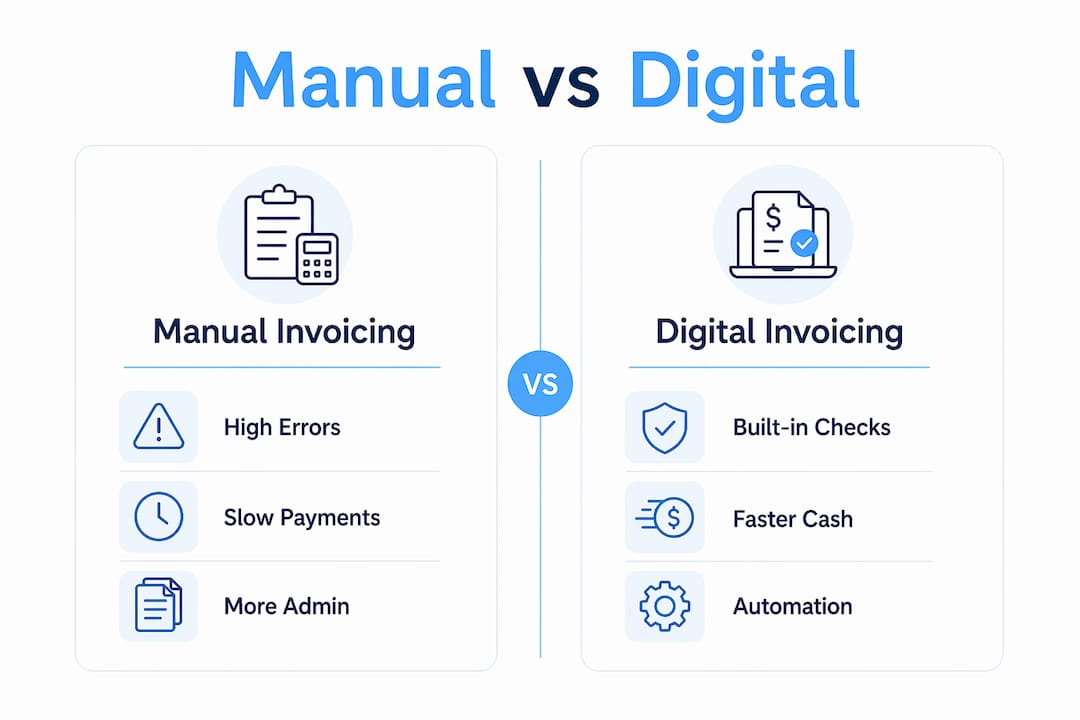
Deep knowledge from AutoFlow Guide confirms that triggering invoice creation from project milestones and relying on platforms’ native reminder capabilities yields the most consistent and scalable workflows. Start with one trigger and one reminder sequence, then expand once the system proves reliable.
How does digital invoicing enhance accuracy and reduce administrative errors?
Manual invoicing carries a specific set of risks: transposed numbers, missing VAT references, incorrect totals, and wrong payment details. Each error creates a dispute that delays payment and damages client trust. Structured electronic invoicing removes most of these risks at the point of creation.
Stripe’s e-invoicing research confirms that e-invoicing formats include built-in validations for tax IDs, VAT, totals, and invoice references, which significantly lowers the risk of compliance errors and tax penalties. The system checks the invoice before it leaves your platform, not after the client flags a problem.
Here is a direct comparison of manual versus digital invoicing on the accuracy dimension:
| Factor | Manual invoicing | Digital invoicing |
|---|---|---|
| Data entry errors | High risk, human-dependent | Low risk, auto-populated fields |
| VAT and tax calculations | Manual, error-prone | Automated, rule-based |
| Invoice reference tracking | Spreadsheet or memory | System-generated, searchable |
| Audit readiness | Requires manual file organization | Auto-archived, timestamped |
| Compliance penalties | Higher exposure | Reduced through validation |
The audit readiness point is underappreciated. When every invoice is stored, timestamped, and linked to a payment record, your year-end tax filing becomes a data export rather than a document hunt. The European Commission’s eInvoicing guidance specifically highlights that structured formats support financial transparency and reduce the administrative burden of compliance. For freelancers operating as sole proprietors or LLCs, that transparency matters when working with accountants or responding to tax authority queries.
What practical advantages does digital invoicing offer for client management?
The digital invoicing benefits that freelancers notice first are speed and accuracy. The ones that compound over time are client management and scalability. When your billing system gives you real-time visibility into invoice status, you stop guessing and start acting on data.
Stripe’s platform data shows that e-invoicing systems allow users to see the exact moment an invoice is opened, approved, or has a payment initiated. This changes how you manage client relationships. Instead of sending a generic “just checking in” email after two weeks, you can follow up with precision: “I can see the invoice was opened on Tuesday. Is there anything blocking approval?”
The practical advantages extend across several areas:
-
Scalable billing. Recurring invoice templates mean adding a new retainer client takes minutes, not an hour of copy-paste work.
-
Centralized client records. Every invoice, payment, and communication sits in one place, which reduces the back-and-forth when clients dispute amounts or request copies.
-
Professional presentation. PDF invoices with your branding, clear payment terms, and a direct payment link signal that you run a serious operation. Clients who work with multiple freelancers notice the difference.
-
Faster dispute resolution. When a client questions a charge, you can pull the original invoice, the delivery confirmation, and the payment record in seconds rather than digging through email threads.
Pro Tip: Set your invoice payment terms to Net 14 instead of Net 30 as a default. Most clients pay within the stated window, and the shorter term improves your cash position without creating friction. You can always extend terms for specific clients who request it.
AutoFlow Guide’s research puts the time cost of manual billing admin at 100 to 150 hours per year, which automated invoicing workflows can cut nearly entirely. That is three to four weeks of working time returned to billable projects or business development. The impact of digital invoicing on a freelancer’s annual capacity is not trivial.
Key takeaways
Digital invoicing is the most direct lever freelancers have to accelerate payments, reduce billing errors, and reclaim hours lost to manual admin.
| Point | Details |
|---|---|
| Payment speed doubles | E-invoices are paid twice as fast as paper invoices due to instant validation and fewer disputes. |
| Automation saves 100+ hours yearly | Connecting project tools to invoicing platforms via Zapier or Make eliminates most billing admin. |
| Built-in validation cuts errors | Structured formats auto-check VAT, totals, and references before invoices reach clients. |
| Real-time status tracking | Knowing when a client opens an invoice lets you follow up with precision instead of guessing. |
| Scalability without extra work | Recurring templates and automated reminders let you handle more clients without more admin time. |
Why most freelancers underestimate what invoicing can do for them
I have worked with enough freelancers to know that most treat invoicing as a necessary chore rather than a business function worth optimizing. That mindset is expensive. The average freelancer I have spoken with spends close to two hours a week on billing tasks that a properly configured system would handle in minutes. Over a year, that is time that could go toward a new client, a new skill, or simply not working on a Saturday.
The bigger mistake I see is adopting a digital invoicing tool but not connecting it to anything. You get a nicer-looking invoice, but you still send it manually, still follow up manually, and still reconcile payments by hand. The real gain comes from treating your invoicing platform as the center of a small financial system, not just a document creator.
My honest recommendation: start with one automation. Pick the trigger that costs you the most time, whether that is sending the initial invoice or chasing overdue payments, and automate that single step first. Once it runs reliably for a month, add the next layer. Freelancers who try to build the full stack at once often abandon it when one piece breaks.
The future of freelance finance management is not more software. It is fewer manual decisions. Every invoice that goes out without you touching it, every reminder that fires without you writing it, is a compounding return on the hour you spent setting up the system. That is the real role of digital invoicing for freelancers in 2026.
— Deniel
Send professional invoices and get paid faster with Facturapp
If you want a billing system that works without a complex setup, Facturapp is built specifically for freelancers and small business owners. At $39.99 per year, it covers everything you need: professional PDF invoices, direct payment links through Stripe and Klarna, partial payment support, and client management in one place.
You can create and send your first invoice in minutes, with no unused features cluttering the interface. Facturapp’s freelancer invoicing platform gives you the payment speed and accuracy advantages of digital invoicing without the enterprise price tag or the learning curve. For freelancers who want to get paid faster and spend less time on billing admin, it is a direct solution.
FAQ
What is the role of digital invoicing for freelancers?
Digital invoicing automates the creation, delivery, and tracking of invoices, which reduces billing errors, speeds up client payments, and frees freelancers from manual admin tasks. It converts invoices from static documents into structured data that connects directly to payment systems.
How much faster are e-invoices paid compared to paper invoices?
E-invoices are typically paid twice as fast as paper invoices, according to UK Small Business Commissioner data cited by Stripe. Instant validation on the client side removes the approval delays that slow paper-based billing.
What tools do freelancers use for automated invoicing?
Freelancers commonly use platforms like HoneyBook, Bonsai, FreshBooks, and QuickBooks for native automation. Middleware tools like Zapier and Make connect project management apps to invoicing platforms for custom milestone-based triggers.
How does digital invoicing reduce billing errors?
Structured e-invoicing formats include built-in validations for VAT, totals, tax IDs, and invoice references. These checks run automatically before the invoice is sent, catching errors that manual entry would miss.
How much time can automated invoicing save a freelancer?
Billing admin typically consumes 100 to 150 hours per year for freelancers who handle it manually. Automated invoicing workflows can eliminate most of that time, returning it to billable work or business development.
Recommended
Related guides
Keep going in the same topic cluster so your billing workflow stays connected end to end.
- Branded Invoices for Small Business: Build Trust and Get Paid FasterDiscover how branded invoices for small business enhance professional image, streamline payment terms, and boost cash flow. Learn to create professional PDF…Read
- What a Small Business Invoice System Should Actually Help You DoA usable small business invoice system should streamline creating, sharing, and getting paid on professional invoices. It must simplify client records, servi…Read
- Invoice-Only Items for Custom Jobs: Speed Up Billing with Payment Links and Partial PaymentsDiscover how invoice-only items for custom jobs help freelancers create cleaner PDF invoices, attach payment links, and get paid faster without cluttering th…Read
- How to Send an Invoice with a Direct Payment LinkHow to Send an Invoice with a Direct Payment Link ! Woman sending invoice via laptop at home office Sending an invoice with a direct payment link means embed…Read
- How Freelancers Can Choose Invoice Templates That Look Professional and Get UnderstoodA freelancer invoice template should look polished and help clients pay without confusion. Learn what elements matter, how to brand your invoices, and why pa…Read
Put this into practice with FacturApp
Continue with the product path that matches this guide—or compare plans when you are ready to start.